Fortnite Emote Wheel for Gorilla Tag — Download & Install Guide
What Is the Fortnite Emote Wheel Mod?
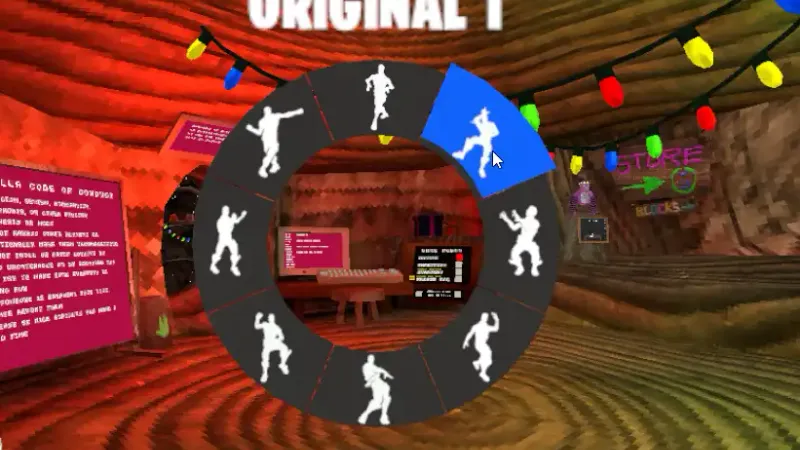
The Fortnite Emote Wheel mod brings Fortnite’s signature dance and emote system into Gorilla Tag. Instead of typing commands or opening a menu, you hold a button to pop up a radial emote wheel - the same style Fortnite players know - pick an emote with your hand, and your gorilla starts dancing in front of the lobby.
It is purely cosmetic: emotes do not change movement, speed, or gameplay. That makes it one of the most popular social mods for private lobbies, content recordings, and trolling friends after a tag.
Key Features
- Radial emote wheel: Hold a binding to open the wheel, flick to an emote, release to play it - no chat commands needed.
- Fortnite-style dances: Plays recognizable emote animations on your gorilla avatar for everyone in the lobby to see.
- Lightweight: Cosmetic-only, so it has almost no performance cost and plays nicely alongside other mods.
- Lobby-safe by design: Because it changes nothing about gameplay, it is welcome in nearly every modded lobby.
Is the Fortnite Emote Wheel Mod Safe?
The mod itself is a cosmetic plugin with no gameplay advantage, so it carries no competitive ban risk on its own. The standard Gorilla Tag modding rule still applies: install mods through BepInEx, keep them in private or modded lobbies, and respect Another Axiom’s Terms of Service.
As with every download on this site, use the original, unmodified file linked below and keep your game updated after major Gorilla Tag patches.
How to Install the Fortnite Emote Wheel Mod (PC)
- Make sure BepInEx is installed in your Gorilla Tag folder (see our BepInEx guide if you have not done this yet).
- Download the mod using the button at the bottom of this page.
- Extract the downloaded archive. You will get a
.dllplugin file. - Move the
.dllinto yourGorilla Tag/BepInEx/plugins/folder. - Launch Gorilla Tag through Steam, join a private or modded lobby, and hold the emote binding to open the wheel.
Frequently Asked Questions
Does the Fortnite Emote Wheel work on standalone Quest?
Can other players see my emotes?
The wheel does not open in-game. What is wrong?
Ready to Download?
Click below to download this mod. Links point to the developer's official release (mod.io, GitHub) where available, or to an unmodified mirror of the original file when the official link is gone.
Recommended Modding Guides
Step-by-step tutorials to help you safely install, configure, and troubleshoot Gorilla Tag mods.
You Might Also Like
APE ARENA for Gorilla Tag — Download & Install Guide
Download APE ARENA for Gorilla Tag for free. Read our step-by-step setup guide and access direct download links for gameplay.

Banana Platforms Mod for Gorilla Tag — Download & Guide
Spawn curved glowing banana peel platforms beneath your hands with controller grips to climb into the sky and walk on air.
bHaptics Integration Mod for Gorilla Tag — Haptic Suit & Tactile Feedback
Download bHaptics Integration Mod for Gorilla Tag. Connect your TactSuit, TactSleeve, and TactVisor for full physical feedback on tag impacts and surface hits.