Monke Mod Manager for Gorilla Tag — Automated PC Installer & Setup Guide
What Is Monke Mod Manager?
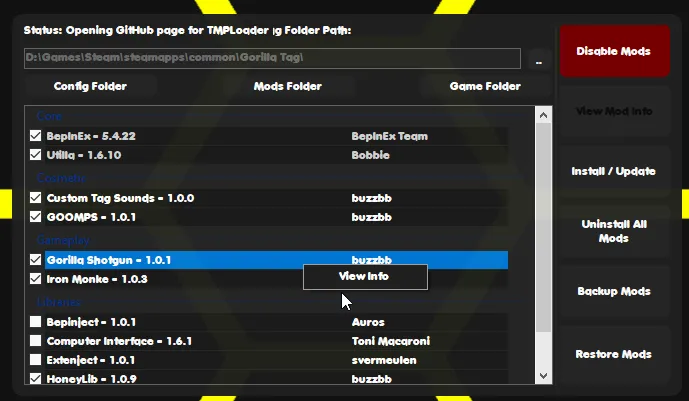
Monke Mod Manager is the premier open-source desktop application designed to automate mod installation for Gorilla Tag on PC VR. Instead of manually downloading ZIP archives, extracting files, and navigating nested Windows folder paths to copy .dll plugins, Monke Mod Manager presents a clean graphical checklist on your computer screen.
With a single click on “Install / Update”, the tool automatically queries verified community repositories on GitHub, downloads the latest compatible releases, and places files into the proper BepInEx/plugins/ subfolders.
Core Features & Built-In Catalog
- Automated Dependency Detection: Automatically installs BepInEx, Unity Doorstop, and Utilla when any gameplay mod is selected.
- One-Click Updates: When new versions of Monke Map Loader or Gorilla Cosmetics release, simply check their boxes and click Install to overwrite outdated files.
- Auto-Path Resolution: Automatically detects your Steam installation directory (
Steam\steamapps\common\Gorilla Tag). - Clean Uninstallation: Includes an option to safely reset your Gorilla Tag directory back to clean vanilla state if you encounter crash loops.
How to Use Monke Mod Manager on PC
- Download
MonkeModManager.exefrom the verified link below. - Run
MonkeModManager.exeon your Windows PC (no complex installation wizard required). - If the tool prompts “We could not find your Gorilla Tag installation”, click Browse and select
Gorilla Tag.exelocated at:C:\Program Files (x86)\Steam\steamapps\common\Gorilla Tag\Gorilla Tag.exe - In the checklist, check the boxes for the mods you want:
- Under Plugins: Utilla, Monke Map Loader, Gorilla Cosmetics, Computer Interface.
- Under Gameplay: Bark, YizziCam.
- Click the green “Install / Update” button in the bottom-right corner.
- The status bar will read “Install Complete”. Launch Gorilla Tag through Steam and enjoy your mods!
Frequently Asked Questions
Can I run Monke Mod Manager on Meta Quest standalone?
Why is Monke Mod Manager giving a 404 GitHub error?
Ready to Download?
Click below to download this mod. Links point to the developer's official release (mod.io, GitHub) where available, or to an unmodified mirror of the original file when the official link is gone.
Recommended Modding Guides
Step-by-step tutorials to help you safely install, configure, and troubleshoot Gorilla Tag mods.
You Might Also Like
BepInEx for Gorilla Tag — Essential PCVR Mod Loader Guide
Download BepInEx 5.4.22 for Gorilla Tag free. The required PCVR mod loader - full install guide, plugins folder setup, and fixes for common errors.
Computer Interface v2.0.1 for Gorilla Tag — Terminal Upgrade Guide
Download Computer Interface v2.0.1 for Gorilla Tag. Upgrade your in-game terminal with custom wallpapers, mod settings menus, and multi-page UI.
BepInEx Setup & Installation Utility for Gorilla Tag — Download & Guide
Quick-start guide and automated setup archive for installing BepInEx on Steam VR and Oculus PC.