Utilla for Gorilla Tag — Custom Gamemodes & Lobby Manager
What Is Utilla?
Utilla is one of the most critical safety and architectural libraries in the entire Gorilla Tag PC modding landscape. Created to resolve conflicts between modded players and official game servers, Utilla acts as a strict gatekeeper and custom gamemode manager.
In the early days of Gorilla Tag modding, players running custom mods frequently bled into vanilla public matchmaking queues, resulting in widespread player frustration and mass ban waves. Utilla solved this problem permanently by hooking into the game’s room connection protocols. It ensures that whenever a player has active mods enabled, they are strictly quarantined to custom rooms, preventing accidental matchmaking bans.
What Does Utilla Do?
- Anti-Ban Room Isolation: Automatically monitors your active BepInEx plugins. If any gameplay-altering mod is detected, Utilla blocks you from joining vanilla public lobbies, routing you exclusively to mod-sanctioned servers.
- Custom Gamemode Support: Adds native support for community gamemodes beyond default Infection, including Casual, Paintbrawl, Freeze Tag, and Prop Hunt.
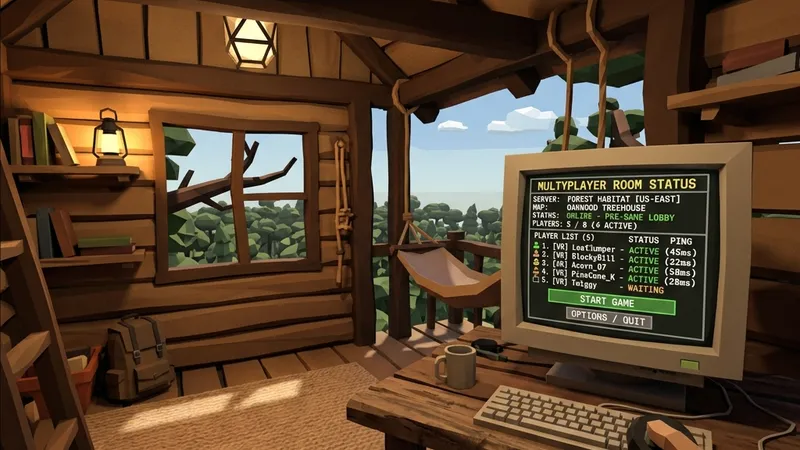
- In-Game Room Status Indicator: Displays a clear status badge on your computer terminal in the treehouse, showing whether your current room is Modded or Vanilla.
- Developer Hooking API: Provides mod developers with standardized events (
OnRoomJoined,OnRoomLeft,OnModdedJoined) to ensure mods initialize and shut down cleanly when switching servers.
How to Install Utilla
Utilla requires BepInEx to be installed first:
- Ensure BepInEx 5.4.22+ is already installed in your Gorilla Tag game directory.
- Download
Utilla.7zfrom the verified download link below. - Extract
Utilla.dllinto your plugins folder:Gorilla Tag\BepInEx\plugins\ - Launch Gorilla Tag. Look at your in-game computer in the treehouse—you will see a new “MODDED” gamemode selector tab confirming successful installation.
Frequently Asked Questions
Why do my mod menus say "Waiting for Utilla"?
Does Utilla work on standalone Meta Quest?
Ready to Download?
Click below to download this mod. Links point to the developer's official release (mod.io, GitHub) where available, or to an unmodified mirror of the original file when the official link is gone.
Recommended Modding Guides
Step-by-step tutorials to help you safely install, configure, and troubleshoot Gorilla Tag mods.
You Might Also Like
BepInEx for Gorilla Tag — Essential PCVR Mod Loader Guide
Download BepInEx 5.4.22 for Gorilla Tag free. The required PCVR mod loader - full install guide, plugins folder setup, and fixes for common errors.
Computer Interface v2.0.1 for Gorilla Tag — Terminal Upgrade Guide
Download Computer Interface v2.0.1 for Gorilla Tag. Upgrade your in-game terminal with custom wallpapers, mod settings menus, and multi-page UI.
BepInEx Setup & Installation Utility for Gorilla Tag — Download & Guide
Quick-start guide and automated setup archive for installing BepInEx on Steam VR and Oculus PC.